
Making Python 2x Faster on Apple Silicon
CPU types still matter, on your laptop and in production


Intro
Hello friends. I recently upgraded to a new MacBook and somehow made my development environment slower. The culprit? Architecture mismatches — x86 binaries running through Rosetta 2 at roughly half the speed of native ARM builds. Naturally, I vibe-coded some benchmarks to measure the real cost.
The Easy Part
I got a new laptop, ran Migration Assistant to copy my old machine’s data, and immediately noticed Cursor was sluggish. Turns out my Cursor build was x86, so I downloaded the ARM version, which was instantly faster. A few other apps had the same problem — some detected it and prompted me to upgrade, while others I had to track down manually.
The Harder Part
Node stopped working entirely. I migrated to nvm to manage my node versions.
Then Terraform started timing out on nearly every run. I migrated to tfenv, grabbed an ARM build, and the timeouts disappeared.
Then I discovered that I was also running an x86 version of Python.
I verified like this:
? file /usr/local/bin/python3
/usr/local/bin/python3: Mach-O 64-bit executable x86_64
To install an ARM Python, I needed to install an ARM Homebrew first. ARM Homebrew installs in /opt/homebrew, while the x86 version installs in /usr/local. You can see the logic here.
I then verified my ARM Python installation:
? file /opt/homebrew/bin/python3
/opt/homebrew/bin/python3: Mach-O 64-bit executable arm64
How Was Anything Working?
The x86 binaries ran instead of crashing thanks to Rosetta 2, Apple’s compatibility layer that translates x86 instructions to ARM on the fly.
If you want to learn more, this deep dive was the best explanation I found.
Vibe Benchmarks
A colleague from a recent client migrated a production cluster to ARM and cut costs by 20%.
Why? ARM excels at performance per watt.
For example, if you’re running in AWS:
AWS Graviton instances typically offer 20-40% better price/performance than comparable x86 instances for many workloads, especially things like web servers, containerized applications, and data processing pipelines.
I’ll do some Graviton benchmarks another day. For now, I vibecoded some local benchmarks to see the results with my own eyes.
Code is here.
Who’s ready to stare at some graphs? I’ve also added text tables for numeric results. Apologies, the formatting is a bit rough.
Simple Python stuff
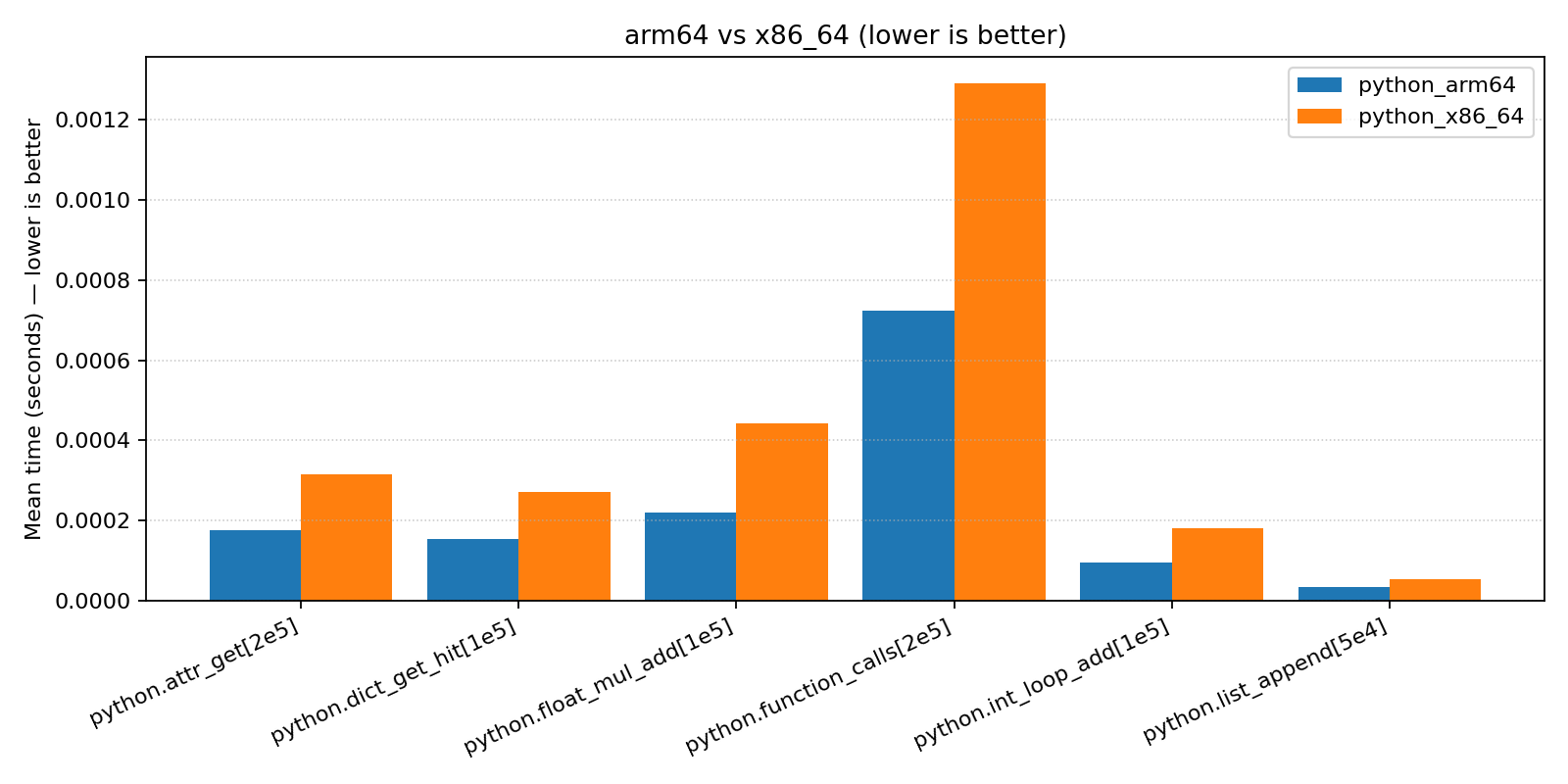
Benchmark Comparison (median μs): python_arm64 vs python_x86_64
========================================================================
Benchmark Name            |        A |      B   | python_arm64 faster by
------------------------------------------------------------------------
python.attr_get[2e5]       |  177.789 |  316.315 |      1.78x
python.dict_get_hit[1e5]   |  154.053 |  271.306 |      1.76x
python.float_mul_add[1e5]  |  221.117 |  438.748 |      1.98x
python.function_calls[2e5] |  725.269 | 1295.122 |      1.79x
python.int_loop_add[1e5]   |   94.975 |  180.209 |      1.90x
python.list_append[5e4]    |   32.790 |   53.129 |      1.62x
========================================================================
NumPy
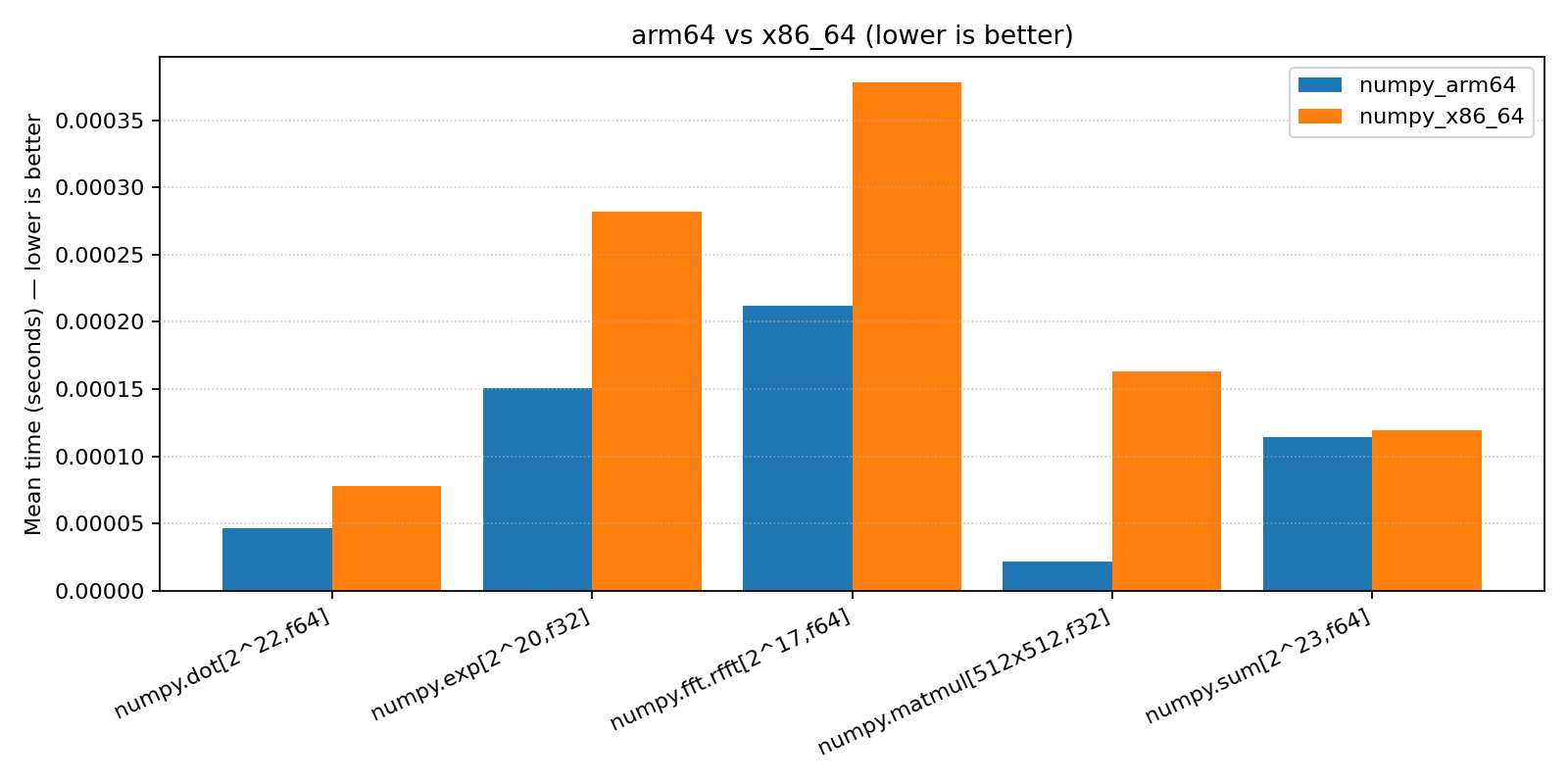
Benchmark Comparison (median μs): numpy_arm64 vs numpy_x86_64
======================================================================
Benchmark Name             |       A |       B | numpy_arm64 faster by
----------------------------------------------------------------------
numpy.dot[2^22,f64]        |  46.551 |  78.138 |      1.68x
numpy.exp[2^20,f32]        | 151.855 | 280.790 |      1.85x
numpy.fft.rfft[2^17,f64]   | 211.398 | 376.269 |      1.78x
numpy.matmul[512x512,f32]  |  21.493 | 163.025 |      7.59x
numpy.sum[2^23,f64]        | 113.523 | 119.899 |      1.06x
======================================================================
XGBoost training
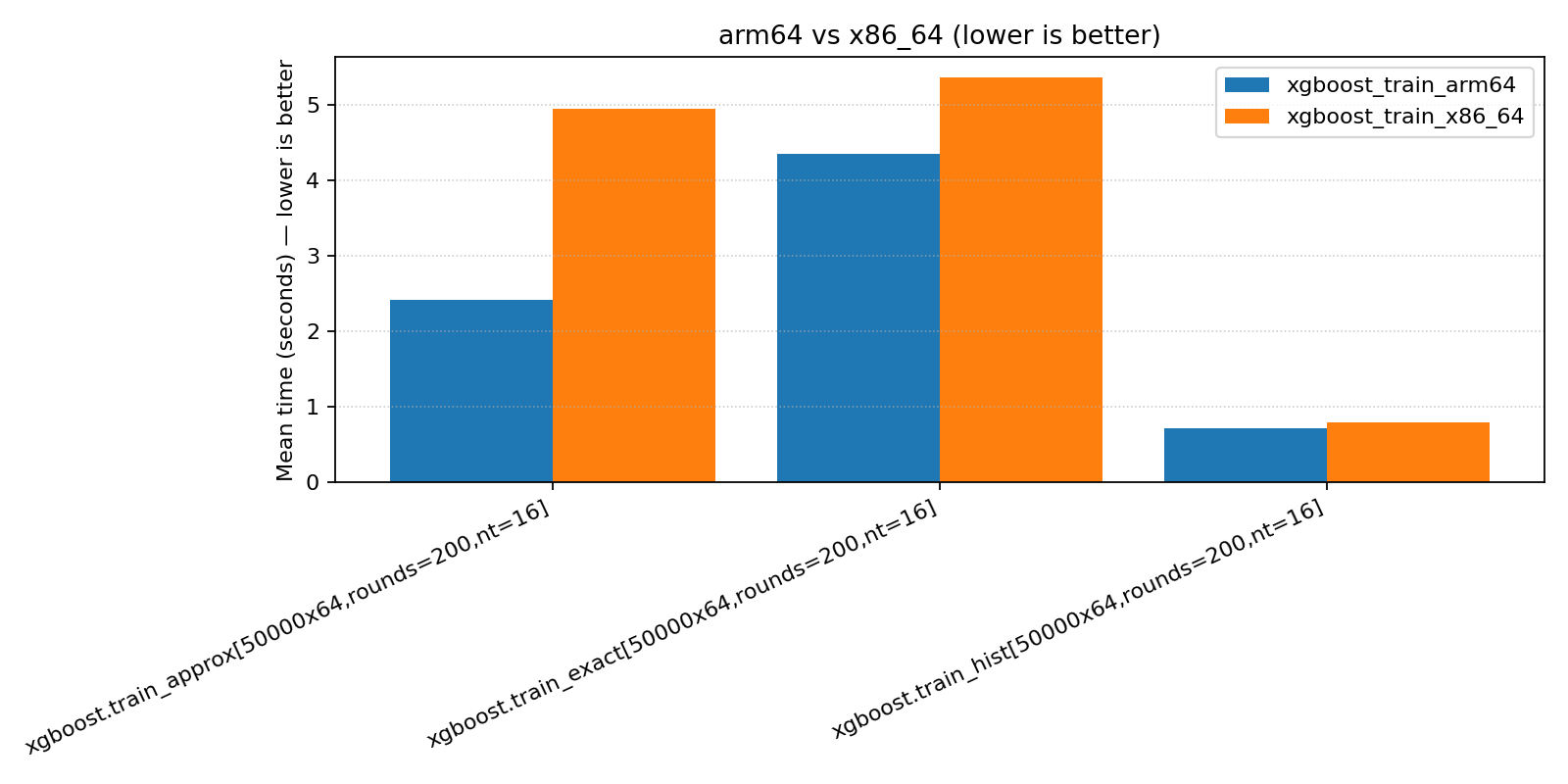
Benchmark Comparison (median s): xgboost_train_arm64 vs xgboost_train_x86_64
========================================================================
Benchmark Name           |     A |     B | xgboost_train_arm64 faster by
------------------------------------------------------------------------
xgboost.train_approx[50000x64,rounds=200,nt=16]|2.408|4.936 |      2.05x
xgboost.train_exact[50000x64,rounds=200,nt=16] |4.344| 5.362|      1.23x
xgboost.train_hist[50000x64,rounds=200,nt=16]  |0.715|0.793 |      1.11x
========================================================================
XGBoost inference
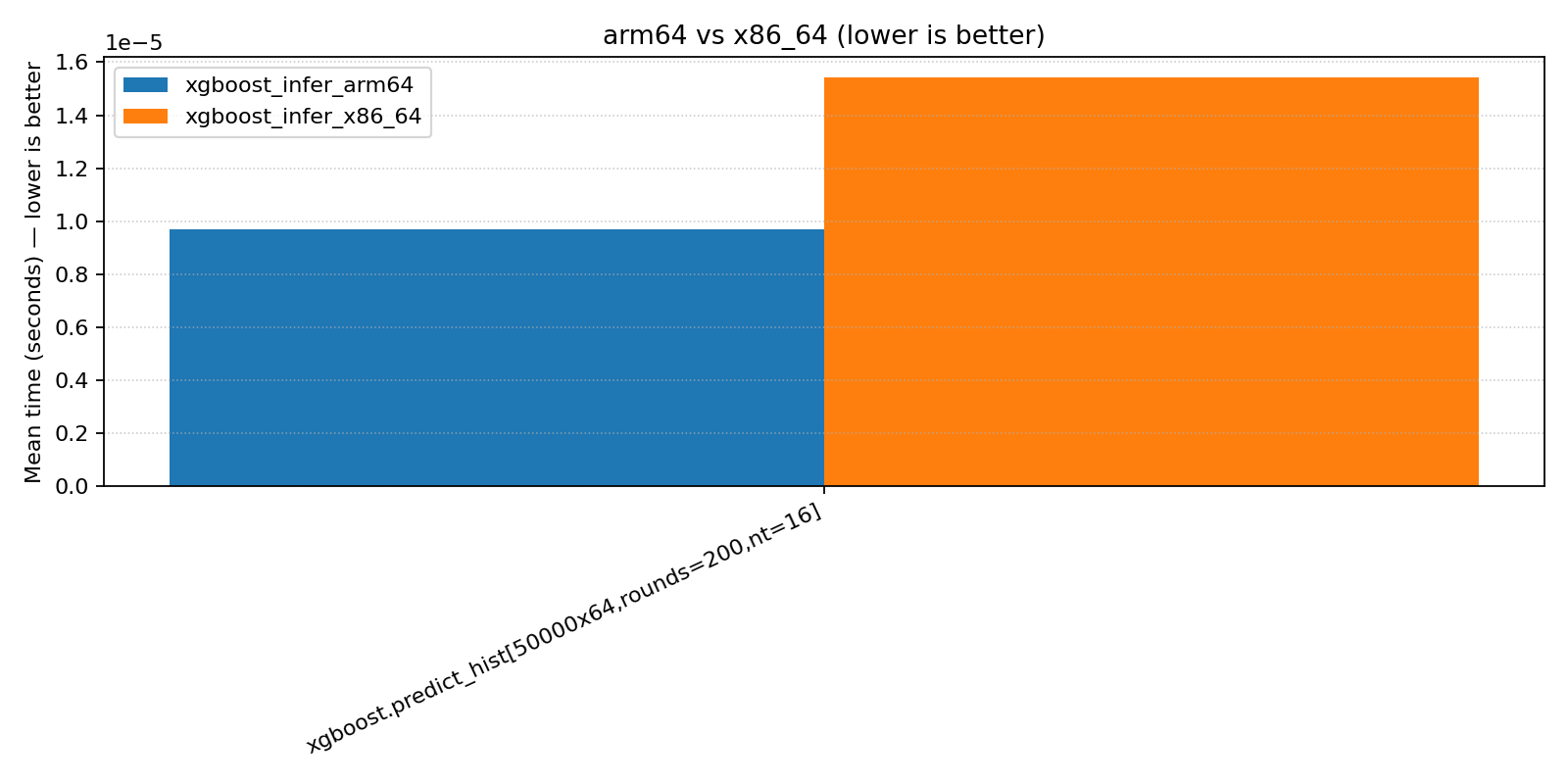
Benchmark Comparison (median μs): xgboost_infer_arm64 vs xgboost_infer_x86_64
========================================================================
Benchmark Name         |      A |      B | xgboost_infer_arm64 faster by
------------------------------------------------------------------------
xgboost.predict_hist[50000x64,rounds=200,nt=16] | 9.674 | 15.411 | 1.59x
========================================================================
Benchmark Notes
Overall, ARM showed a ~1.5-2x improvement over x86 across most benchmarks.
The main exception was XGBoost training. My first test used
tree_method=hist, which was only a marginal improvement on ARM. I then investigated XGBoost tree methods and learned abouttree_method=exactandtree_method=approx.approxshowed the best improvement, in line with other benchmarks.
When Benchmarks Meet The Real World
You may have noticed something: my benchmarks show ~2x performance improvement, but my colleague’s cluster migration only cut costs by 20%.
Why? First, ARM and x86 are CPU architectures, so CPU-centric benchmarks will show the largest differences.
The NumPy benchmarks are an example of this:
numpy.sumis a memory-bound operation, so the difference is negligible.numpy.matmulis a CPU-bound operation, so the difference is severe — roughly 5x.
Many real-world production systems spend significant time on non-CPU work, like I/O for disk access or network calls. A web server waiting on API responses or a data pipeline bottlenecked on S3 reads won’t see a 2x improvement from a faster CPU.
Conclusion
For ARM vs. x86, the 2x performance difference for CPU-bound workloads is real.
If you’re on Apple Silicon, make sure your development tools are running native ARM builds.
Happy holidays. Thanks for reading my posts in 2025. Stay with me in 2026 for more graphs, vibes, and production war stories.

If you enjoyed this post, you’ll also enjoy:
PUSH TO PROD OR DIE TRYING: High-Scale Systems, Production Incidents, and Big Tech Chaos
New Year’s Sale - 25% off until 1/5/2026
Great breakdown of the architecture mismatch problem. The numpy.matmul showing 7.59x improvement versus numpy.sum at 1.06x really demonstrates which workloads actualy benefit from ARM's design. I've seen similar patterns migrating containerized services to Graviton where CPU-heavy batch jobs flew but API services with heavy I/O barely changed. The Rosetta 2 overhead is sneakier than most devs realize though, so verifying architecture with that file command should honestly be part of onboarding checklists for M-series machines.