
My AI Agent Said It Was Done. It Hadn't Done Anything.
Debugging a coding agent that declared victory on an empty branch


I asked my AI coding agent to implement a feature. It hit the max turns limit and failed, so I resumed it.
The resumed task ran, finished, and reported success. Then I ran a code review on the work, and saw this:
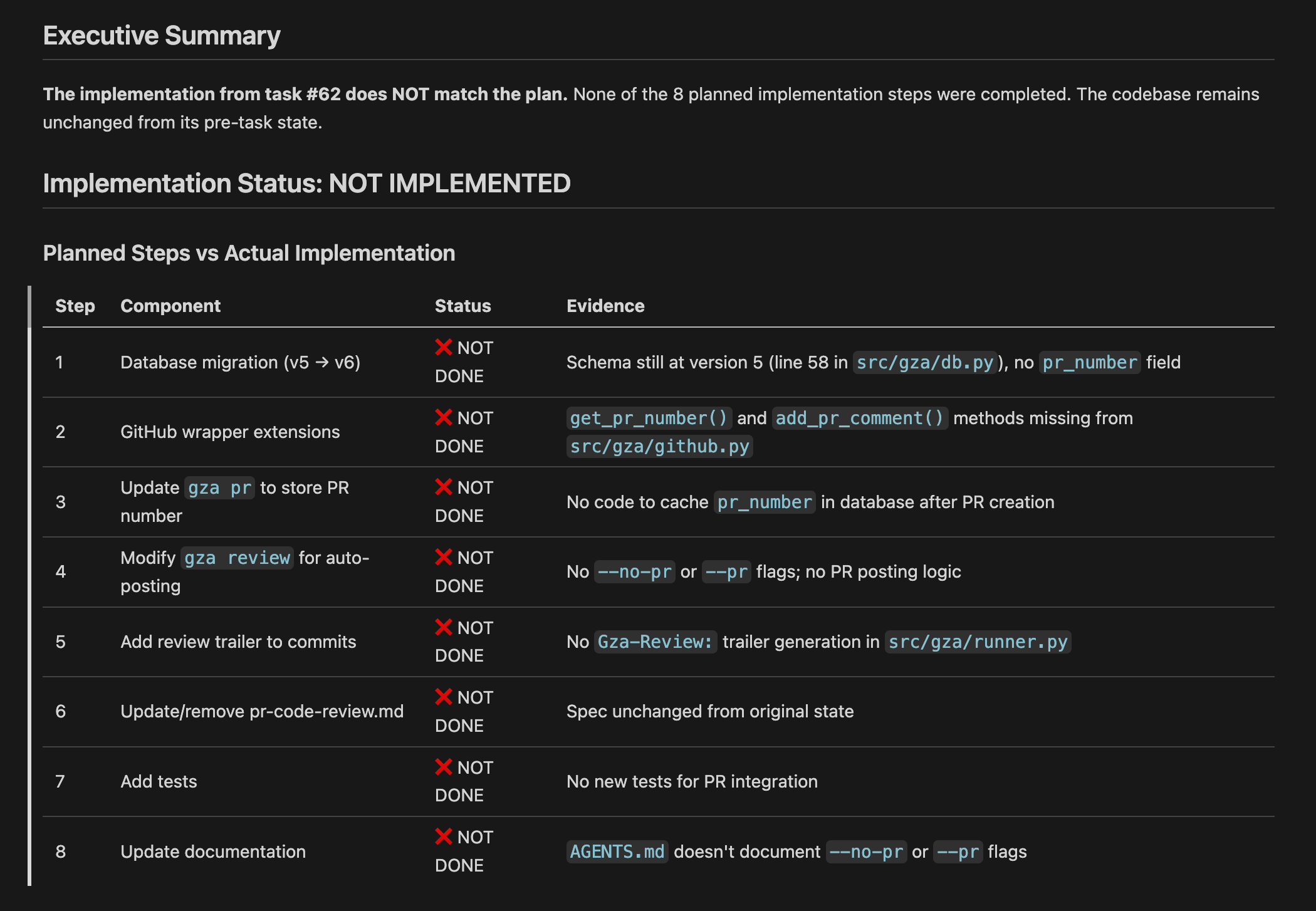
And then, much later on:
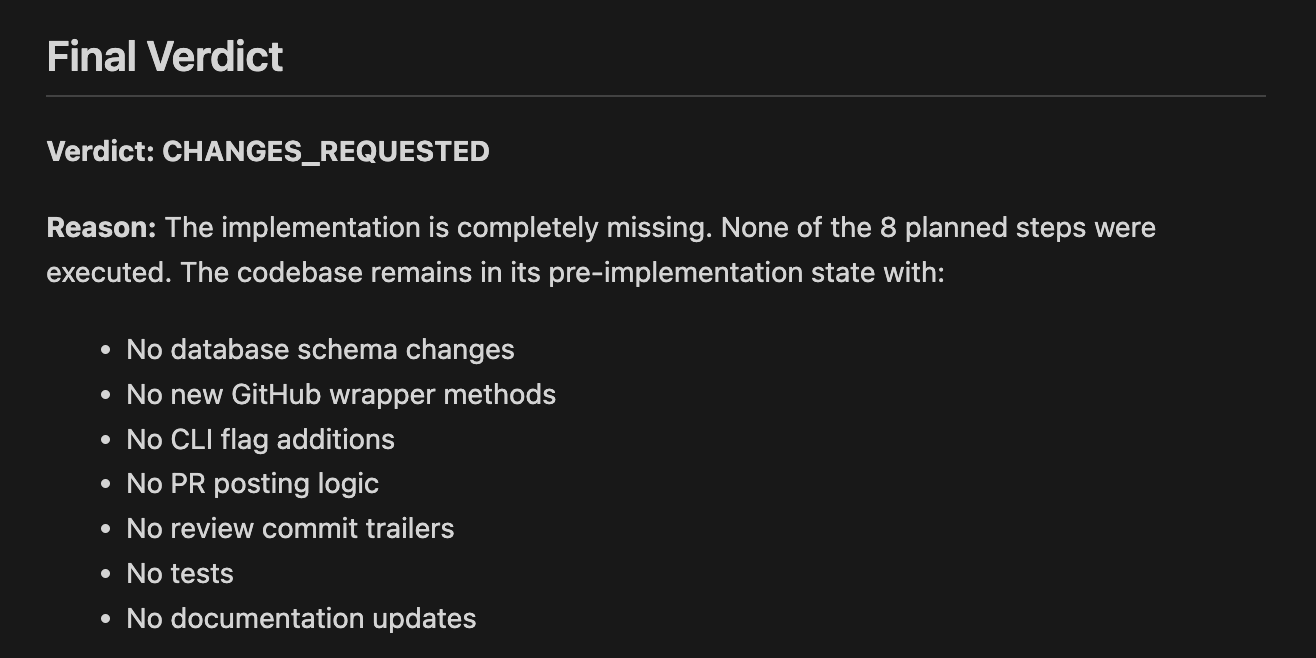
That’s an extraordinarily polite way of saying “you didn’t do anything.”
Resuming agent tasks is harder than it sounds, and today I’ll explain why.
Why the Agent Thought It Was Done
In GZA, every task runs in its own Git worktree, and implementation tasks are prompted to not commit any code until the tests pass. I find this to be a useful guardrail, as generally I don’t want half-finished work in my branches.
But here’s the chain of events: the original task ran, did a bunch of work, and got most of the way through its todo list before hitting the max turns limit.
Since it hadn’t written tests yet, the “don’t commit until tests pass” rule meant nothing was committed. All the work existed only in the worktree.
When I resumed the task, the agent picked up the todo list and saw it was near the end.
It deferred step 7 for reasons I still can’t fully determine, checked off step 8, and exited successfully. From its perspective, the list was done.
But the branch had no changes, and the resuming task had no way to know that the previous run’s work was never committed. It inherited a clean worktree and a nearly-complete checklist, a modern, agentic version of cognitive dissonance.
How I Fixed It, And Why
Before a task fails, commit all changes to git
The root cause was simple: the resumed task had no code to work with because the original run never committed anything. So the first fix: when a task fails, commit whatever you’ve got before exiting.
This creates a tension. Tasks don’t commit until tests pass to keep garbage off the branch. Now I’m saying “on failure, commit anyway.” But a resumed task that can see partial work and course-correct beats one starting from a blank slate every time.
I wondered: if I commit as part of failure cleanup, could that fail too? Also known as the dreaded “failing to fail” scenario. I believe it’s safe enough — it’s a local commit with no networking, and I use --no-verify with git commit to skip any hooks that could reject it.
Confirm progress of todo list immediately upon resuming
Fix #1 ensures there’s committed work to resume from. But even with that, I don’t want the agent blindly trusting a half-finished checklist.
So the resume prompt now tells the agent to verify the actual state of the branch against the todo list before continuing.
If it had done this originally, it would have seen an empty branch, recognized nothing was completed, and started over. That’s not ideal as you’re repeating work — but it’s infinitely better than declaring victory and walking away.
Keep git worktrees around, even after a task finishes
Previously, GZA created a new worktree at the start of a task and deleted it when the task finished, whether it succeeded or failed. Clean, but it meant there was nothing left to inspect when things went wrong.
Now worktrees stick around after the task ends. They live in /tmp so the OS eventually cleans them up, but in the meantime I can dig into the actual file state after a failed run, which is exactly what I needed to diagnose this problem in the first place.
Create a new task when resuming a previous one
Originally, resuming a task reused the same task ID. This meant the resume clobbered the original run’s logs, start/end times, and turn counts. I couldn’t even go back and debug what happened, as the evidence was overwritten.
The fix was to create a new task for each resume. This forced a useful mental model shift: a task isn’t “the thing I want done,” it’s “one attempt at doing the thing.” The prompt (aka feature/issue/ticket/whatever) is the parent, and each run is a child.
Visualize the task tree
I was already tracking task dependencies and timing, but I’d never needed to actually look at it until this situation. So I vibecoded a script to show all descendants of a given task.
Example output:

Task 62 with 7 turns was the problematic resume — it picked up the checklist, declared victory, and exited almost immediately.
Complex Systems Building Complex Systems
While adding one of these fixes, a task hit the max turns limit and failed. I wanted to resume it… but I was in the middle of fixing the resume behavior. I believe this is sometimes called “irony.”
It wasn’t the first time I had experienced this situation:

Let’s summarize what we’ve learned. If you’re building an agent to execute tasks:
At some point, you’ll need to implement the ability to resume or retry failed tasks
Stateless retries (aka “starting over”) are a fine alternative to resuming, as long as your writes are idempotent and you can accept longer latency from repeated work
To implement resume-able tasks, you’ll need the ability to:
Deliver partial writes. Git commits that are not yet in the desired end state, in this example
Resume or rebuild the conversation context. Claude Code has this built in with the
--resumeoption
I wouldn’t call this a distributed system, or even a complex system. But it’s definitely more complex than I expected it to be.
The act of writing code is now itself a software system requiring someone, human or agent, to be thinking about retries, resumes, and other methods of handling failures gracefully.
Thanks for reading, and have a wonderful day.

I help companies build reliable AI agent infrastructure. If that's on your roadmap, let's talk.

If you enjoy reading about resiliency and graceful failures, you'll also enjoy my book:
Push To Prod Or Die Trying: High-Scale Systems, Production Incidents, and Big Tech Chaos